Tracking Auction Lots
 By GQ · Collector & Antique Specialist
I built this because the auctions I follow are never on one site. A lot from one of the big houses, something off an aggregator, a piece on a marketplace — each would live in a different tab, and my own notes lived in a spreadsheet that was always out of date. Lot tracking in Gotique is just where I keep every sale I'm watching, wherever it lives, side by side, so I can think about them together instead of one tab at a time.
Key Findings
- Gotique imports auction lots from 30+ platforms — aggregators, marketplaces, and auction houses — into a single tracked list.
- Importing a lot from its listing URL is free and rate-limited; only running the AI analysis that produces a Gotique estimate costs 1 credit.
- The Gotique estimate comes from an independent read of the lot's photos — the analysis never sees the house's number.
- Refresh pulls the current high bid while a sale is live, and the final sold price once it closes.
Why track lots across auction houses in one place?
Because the lots you actually care about are spread across many sites, and nothing ties them together. The catalog lives on the house's site, the estimate is buried in the listing, and your own thoughts end up in a spreadsheet or a pile of browser tabs you forget to revisit. A project in Gotique replaces that: paste each lot you're watching into one named folder — the aggregators, the big houses, and the marketplaces, all in the same list — and you can scan the whole week of upcoming sales at once. The lot keeps its photos, estimate, and a link back to the original listing, so nothing gets stale and you never have to rebuild the spreadsheet.
What can you do with a tracked lot?
Paste a listing link and it imports itself
Paste the URL of an auction listing and Gotique fetches what it can read from the page: the lot images, the house estimate, dimensions, provenance text, and the buyer's premium. You don't retype anything — the lot lands in your project with its details filled in. Importing is free, so adding everything you're curious about costs nothing.
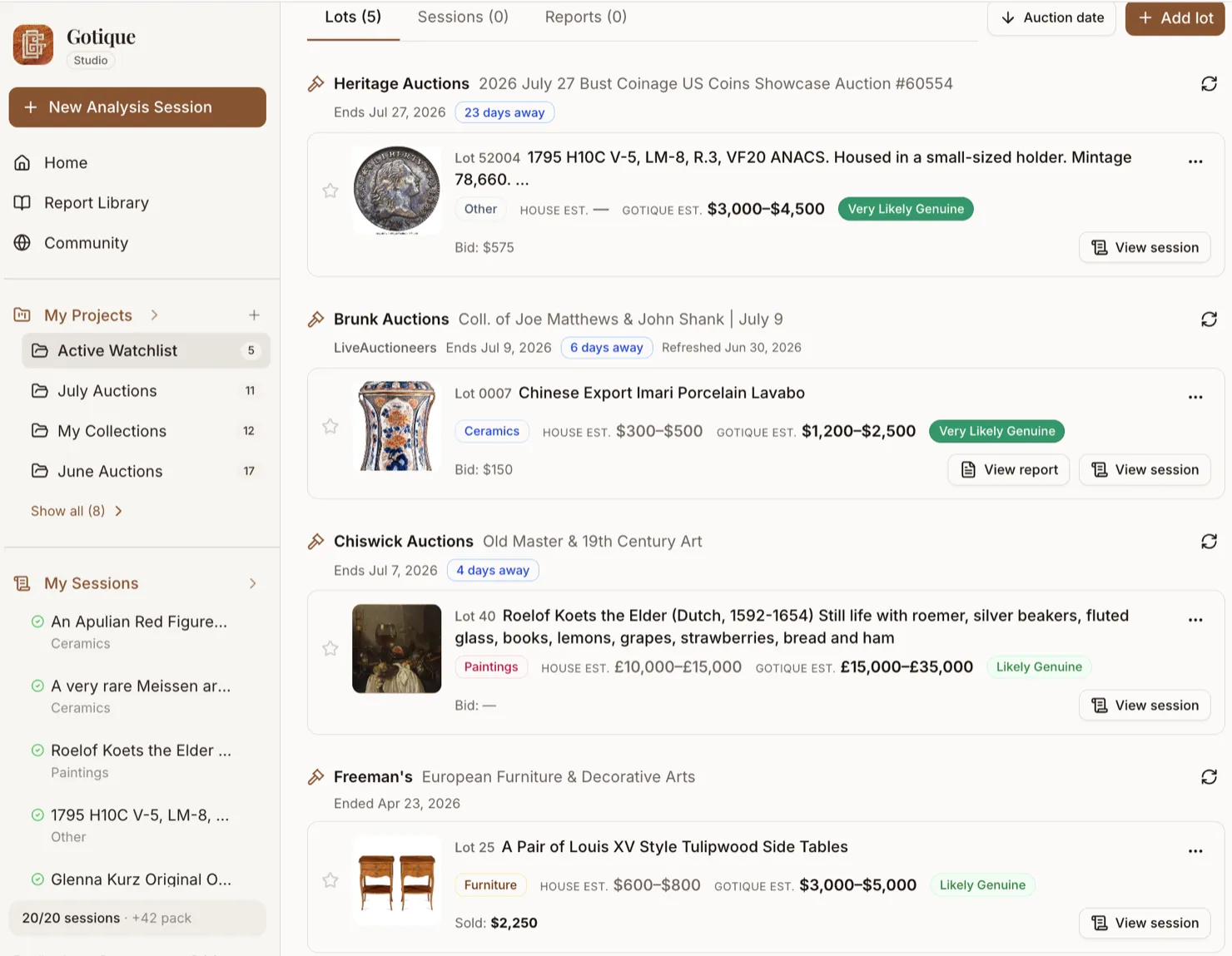
House estimate next to a Gotique estimate
When you analyze a lot, you get a Gotique estimate shown right beside the house's estimate. It's an independent second read, not a re-quote of the house number — the analysis never sees what the house guessed, so it can't be anchored by it. That side-by-side is the whole point for me: a second opinion before I decide what something is worth bidding.
Refresh to pull the current bid or final price
Hit Refresh on a lot and Gotique re-reads the listing for the current high bid while the sale is live, and the final sold price after it closes. The lot remembers what it went for, so your watched list quietly becomes a record of what comparable pieces actually sold for.
Importing works across the major aggregators, marketplaces, and auction houses I follow — the aggregators (LiveAuctioneers, Invaluable, HiBid, AuctionNinja, the saleroom), the marketplaces (eBay, Catawiki), the big houses direct (Bonhams, Sotheby's, Christie's, Freeman's, Lyon & Turnbull, Sworders, EBTH), and houses running their own white-label catalog (AuctionMobility, Basta). New platforms get added as I run into them.
Don't see your auction platform? If you're tracking lots from a site Gotique doesn't auto-fetch yet, send us the listing link — through the in-app Feedback form or by email at support@gotique.ai — and we'll look into adding it.
How is the Gotique estimate different from the house estimate?
Both numbers describe the same lot, but they come from different places and serve different purposes. Keeping them side by side is more useful than trusting either one alone.
| House estimate | Gotique estimate | |
|---|---|---|
| Where it comes from | The auction house's own catalog listing. | An independent analysis of the lot's photos — it never sees the house's number. |
| What shapes it | Set to attract bidders; estimates can run conservative or optimistic. | No stake in the sale — a read of what comparable pieces have fetched. |
| How I use it | As the starting reference point I'm reacting to. | As a sanity check before I decide my own ceiling. |
Open a lot and it becomes your hub for that piece
Tracking is the wide view — every sale I'm watching in one list. But when I'm actually deciding whether to bid, I open the lot itself. That detail page pulls everything about that one piece into a single screen, so I'm not bouncing between the house's listing, my notes, and a separate report tab. Here's what's on it.
The house's listing next to Gotique's full analysis
The lot opens with the auction house's catalog write-up on one side and Gotique's full seven-section report on the other — authentication, condition, valuation, the lot. It's the "what they said vs. what we found" read I want before I bid. Once I've read the house blurb I collapse it to a thin rail and give the analysis the whole width.
House estimate vs. Gotique estimate, and the real cost to win it
The house's estimate sits right beside Gotique's independent one, along with the authenticity read. And because the number that actually matters is what it costs to win the lot, the page works out the all-in figure too — the bid or hammer price plus the buyer's premium — so I'm comparing what I'd really pay, not just the headline bid.
Analyze right there — no jumping to another page
If a lot is still just tracked, I can run the analysis on the lot page itself. It streams in where the report will live, costs the one credit, and I never navigate away or lose my place. When a sale is moving fast, that matters.
Ask follow-up questions about the piece
After the analysis lands I usually have a question or two — is that a later repair, does the mark fit the date. I can ask right under the analysis, and it continues the same conversation the report came from, so the answers stay in context with the piece rather than starting cold.
Turn it into a polished report when I'm ready
Generate Report consolidates the analysis and whatever I asked in Q&A into the clean saved report, which I can open in full or view as the session it came from. It's the version I keep once I've decided a lot is worth taking seriously.
A few smaller things live on the same page: Refresh re-reads the listing for the latest bid or final price without leaving the lot, I can jot a private note to myself, and I can see which projects the lot is filed under and jump to any of them.
How to track and watch a lot
- Add a lot from a link. Open a project, tap "Add lot," and paste the auction listing URL. Importing is free; running the analysis that produces a Gotique estimate costs 1 credit.
- Move a lot between projects — or keep it in several. Reorganize lots as your watch list changes; a lot can live in more than one project at once, so a piece can sit in both "This Week" and a long-term theme.
- Star your favorite lots. Tap the star to flag the lots you're most serious about so they stand out in a long list.
- Monitor bid and sold prices. Hit Refresh to pull the current high bid while a sale is live, and the final hammer price once it closes.
- Open the analysis or saved report. From the lot, jump straight to its analysis session or saved report to revisit the full Gotique read.
- Open a lot to compare the listing with Gotique's analysis. Tap any tracked lot to open its detail page — the auction house's listing sits next to Gotique's full report, with the house estimate beside the Gotique estimate and the all-in cost including buyer's premium.
- Analyze, ask follow-ups, and generate a report — all on the lot page. Run the analysis in place (1 credit), ask follow-up questions in the same thread, then generate the polished report — without ever leaving the lot.
What's free and what costs a credit
Importing lots is free and rate-limited — add as many as you like. The only step that uses a credit is running the analysis that produces a Gotique estimate. And that estimate is genuinely independent: the analysis never sees the house's number, so it can't just echo it back.